It was 2 AM on a Wednesday and I was arguing with my terminal. Not debugging. Arguing. Claude Code had decided that my authentication middleware needed a complete rewrite, and I was pushing back, explaining in increasingly frustrated English why the existing pattern was fine, actually, and could it please just add the rate limiter without touching everything else.
Somewhere around the fourth correction, something clicked. Not in the code, but in my head. I realized I had been treating Claude Code like an autocomplete engine with delusions of grandeur, when what it actually wanted was to be treated like a stubborn but brilliant colleague who happens to live inside a command line.
That was six months ago. I have since spent roughly twelve hours a day, six days a week, inside Claude Code. I no longer write code in any traditional sense. I direct, argue, review, course-correct, and occasionally marvel. My biggest bottleneck is not generation. It is reading every single line of what gets generated. (My optometrist is going to have opinions about this.)
Along the way, I have accumulated fifty tips, the kind I desperately wished someone had handed me on day one. Some are tiny keyboard shortcuts that save thirty seconds. Others are workflow shifts that save thirty hours. A few are mistakes I made so you do not have to. All of them come from real projects, real frustration, and the kind of hard-won knowledge you only get from doing something every day until it reshapes how you think.
Here are all fifty. If you are new to Claude Code, start with our beginner's tutorial first, then come back here when you are ready to go deeper.
Foundations (Tips 1-12)
Tip 1: Always run Claude Code from your project root. This matters more than you think. When Claude Code launches, it zips up context from the initial directory: your CLAUDE.md rules, your file structure, your project configuration. Launch from the wrong directory and that initial context is wrong. It is like starting a conversation by introducing yourself with someone else's name. Everything that follows will be slightly off.
Tip 2: Run /init on every new project. This single command has Claude analyze your codebase and generate a starter CLAUDE.md file. It examines your architecture, identifies your stack, notes your patterns. For a Next.js app, it picks up the framework, the routing structure, the key configuration files. For a Swift project, it catches SwiftUI patterns and Xcode build settings. Is it perfect? No. But it is a dramatically better starting point than staring at a blank file and wondering where to begin, which is what I did for my first three projects before someone told me this command existed.
Tip 3: Understand the CLAUDE.md hierarchy. There are two layers: a project-level CLAUDE.md (in your .claude/ directory, checked into the repo) and a user-level memory (in your home directory's ~/.claude/ path). The project rules are shared with your team. The user memory is yours alone. Think of it like the difference between a team playbook and a personal notebook. Both matter, but they serve different purposes. Use /memory to see what Claude Code is currently operating on.
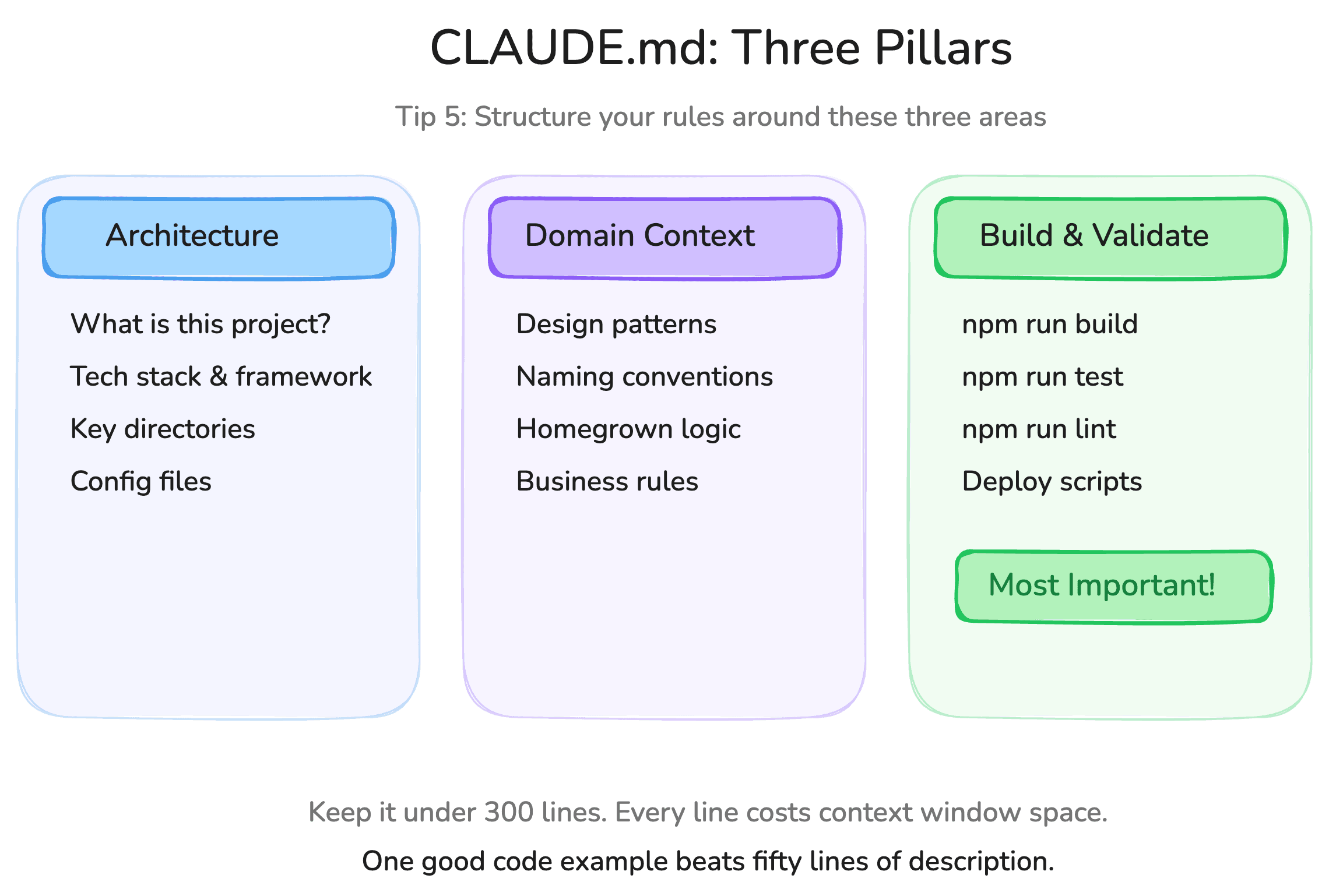
Tip 4: Keep your CLAUDE.md under 300 lines. Every line in that file gets loaded into the context window on every single session. Here is some napkin math that sobered me up: a 500-line CLAUDE.md with verbose instructions was costing me roughly 15-20% of my context window before I even typed my first message. I cut it to 200 focused lines and the improvement in response quality was immediate. More bloat means more noise. More noise means the model is less likely to follow the instructions that actually matter.
Tip 5: Structure your CLAUDE.md around three pillars. First, high-level technical architecture: what is this project, what stack, what are the key directories. Second, domain context: design patterns, naming conventions, anything homegrown that the model would not have seen in training data. Third, build and validation commands: how to compile, how to test, how to verify. That third pillar is arguably the most important. More on this later. (For a comprehensive breakdown of all three pillars with real examples, see our CLAUDE.md definitive guide.)
Tip 6: Shift+Tab toggles between plan mode and edit mode. Learn this shortcut. Burn it into muscle memory. You will use it dozens of times per day. I say this as someone who spent an embarrassing two weeks typing "switch to plan mode" in full sentences before discovering a keyboard shortcut existed.
Tip 7: Always start new features in plan mode. I cannot stress this enough. The instinct is to jump straight into edit mode and let Claude start writing code. Resist that instinct. It is like a surgeon picking up the scalpel before reviewing the chart: technically impressive, probably catastrophic. Plan mode lets you verify your assumptions, challenge Claude's approach, and build up the right context before a single line gets generated. The code generation is the easy part. The context engineering is where the real work happens.
Tip 8: Escape interrupts generation. When Claude is mid-response (thinking, generating, running tools), just hit Escape. A lot of people treat Claude's output as sacred, waiting patiently for it to finish even when they can see it veering off a cliff. Do not do this. Interrupt early, interrupt often. Claude Code handles interruptions gracefully. Your patience is not a virtue here. It is a waste of tokens.
Tip 9: Double-tap Escape to clear your input. If you pasted something huge or typed a prompt you want to discard, double-tap Escape. Gone. Simple, but I know people who have been reselecting and deleting for months.
Tip 10: Double-tap Escape on an empty input to rewind. This pulls up a list of previous conversation checkpoints. You can restore to any prior point, including both the conversation state and the code state. It is a time machine for your session. I use this at least once a day, usually after Claude and I have gone down a path that seemed promising but turned out to be a dead end. (This happens more than I would like to admit.)
Tip 11: Drag screenshots directly into the terminal. If you are doing any UI work, and especially if you are working from Figma designs, get comfortable with this workflow. Take a screenshot, drag it into Claude Code, and say "make it look like this." Multimodal input is one of Claude Code's most underrated capabilities. I rebuilt an entire settings page this way last month: screenshot in, working page out, twenty minutes total. The fidelity was not pixel-perfect, but it was close enough that the refinement took less time than writing the CSS would have.
Tip 12: Run /help to see everything. There are more keyboard shortcuts and commands than I have listed here. The ones above are the ones I reach for every single day. But /help will show you the full catalogue, and it is worth spending ten minutes exploring.
Essential Slash Commands (Tips 13-20)
Tip 13: /clear gives you a fresh context. When you finish a task and want to start something new, clear the context. Old context from a previous task will bleed into and confuse the new one. It is like trying to have a focused conversation while someone reads yesterday's meeting notes into your ear. You could also open a new Claude instance. Functionally the same thing.
Tip 14: /context is your context window audit tool. This is one of the most underused commands and one of the most valuable. It shows you a visual breakdown of what is consuming your context window: which files are loaded, which MCP outputs are taking up space, how much room you have left. If Claude starts feeling sluggish or your token costs spike, run /context and find the biggest offenders. Nine times out of ten, it is MCPs.
Tip 15: Let auto-compaction handle itself. Claude Code automatically compacts your context when sessions get long, summarizing the conversation to free up space. For most projects, auto-compaction works well. I rarely use /compact manually anymore. I used to be paranoid about it, constantly monitoring, manually compacting, trying to optimize every token. That paranoia was counterproductive. Trust the system.
Tip 16: /models lets you switch models mid-session. If you have the budget, use Opus. It is slower but meaningfully better for complex reasoning and architecture decisions, the kind of work where "almost right" and "actually right" are separated by a subtle bug that takes three hours to find. If you are cost-sensitive, default Sonnet handles routine tasks well. But switch to Opus for anything that requires deep thinking. The way I work with multiple Claude instances running in parallel, the slower response time does not matter because I am always doing something else while I wait.
Tip 17: /resume recovers killed sessions. If you accidentally close a terminal tab or kill the wrong process (and if you have not done this yet, you will), you do not lose your context. Run Claude Code again, type /resume, and pick up exactly where you left off. The first time this saved me, I felt the kind of relief usually reserved for finding your wallet after you thought you left it on the bus.
Tip 18: /mcp shows your installed MCPs. Be judicious with MCPs. They are powerful. They teach Claude how to interact with third-party tools like Xcode, Figma, or databases. But every MCP call dumps output into your context window, and some of them dump a lot. I try hard to limit my MCPs to only what the current project requires. If you are wondering which MCPs are worth installing, our roundup of the top 15 MCP servers for Claude Code covers the ones that actually earn their context cost. More on this in the power user section.
Tip 19: Use git as your safety net, not the rewind feature. Claude Code has built-in rewind that can restore code and conversation state. It works. But git is better. Commit frequently. Create checkpoints before big changes. Think of it like saving your game: the autosave feature exists, but you still hit F5 before the boss fight. The rewind feature is your last resort for when you forgot to commit.
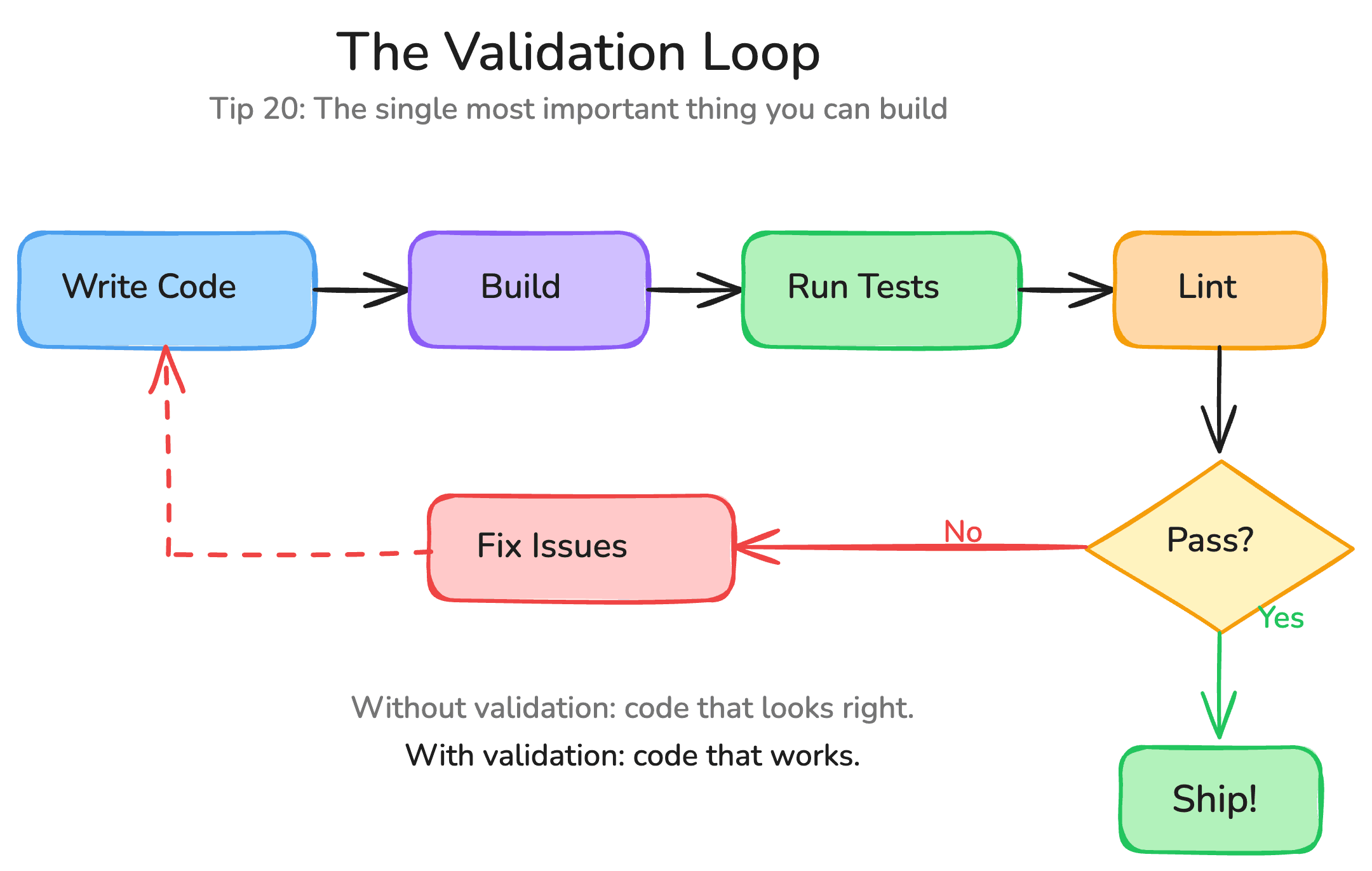
Tip 20: Validation loops are the single most important thing you can build. This is not a slash command. It is a philosophy. If you take one thing from this entire post, let it be this.
The quality of Claude Code's output is directly proportional to the quality of your validation loop. A validation loop is any automated way for Claude to check its own work: build the project, run the tests, lint the code, navigate the app, check the traces. Without validation, Claude generates code that looks right. With validation, it generates code that works.
I learned this the painful way. I spent a week building a feature without a proper validation loop, and when I finally ran the test suite, fourteen tests were broken. Fourteen. If I had invested thirty minutes setting up the validation loop on day one, I would have caught each failure the moment it was introduced. Instead, I spent two days untangling them.
Invest in your validation loop before anything else.
CLAUDE.md Deep Dive (Tips 21-28)
Tip 21: CLAUDE.md reads top to bottom in priority order. Put your most critical rules at the top. If you have hard constraints like "never delete the production database" or "always use server components by default," those go first. Nice-to-have preferences go at the bottom. It is like packing a suitcase for a week-long trip. The things you need first go on top.
Tip 22: Use explicit "never" and "always" directives. Vague guidelines get ignored. Specific directives get followed. "Try to write clean code" is useless. That is like telling a chef to "make it taste good." "Never use any type in TypeScript" is actionable. "Always run npm run lint after editing files" is a rule Claude can actually execute. Be specific. Be directive. Be boring about it.
Tip 23: Include code snippets as examples. If your project has a specific pattern (a custom hook structure, a particular API response format, a naming convention), show a concrete example in the CLAUDE.md. I have found that one good code example is worth fifty lines of written description. The model learns from examples far more effectively than from abstract instructions. This is true for humans too, which is probably not a coincidence.
Tip 24: Focus rules on what is unique to your project. Claude already knows how to write React, Swift, Python. What it does not know is your company's custom DSL, your homegrown state management pattern, your particular file naming convention that made perfect sense six months ago and now confuses everyone including the person who invented it. (That person is usually me.) Every time you find yourself correcting the same mistake twice, that correction belongs in the CLAUDE.md.
Tip 25: Never manually edit your CLAUDE.md. This sounds counterintuitive, but it is the right habit. When you spot a pattern that should become a rule, tell Claude: "Update the CLAUDE.md so we never make this mistake again." Claude will write the rule in a format that works well for Claude. Think of it like training a sous chef. You do not write recipe instructions for yourself. You write them for the person who will actually be cooking.
Tip 26: Use keyword triggers to activate skills. You can set up trigger phrases in your CLAUDE.md that invoke specific behaviors. "Build the app" triggers the Xcode MCP build command. "Run the tests" triggers your test suite. "Deploy to staging" kicks off your deployment script. These keywords become your shorthand vocabulary, a private language between you and your AI that makes everything faster.
Tip 27: Commit your CLAUDE.md to the repository. This is what people are calling "compound engineering," the practice of sharing your AI coding configuration with your team. Once the rules are in the repo, every team member who opens Claude Code gets the same context. Your AI coding experience improves for everyone simultaneously. It is one of the rare cases where individual learning directly becomes organizational learning without any meetings about it. (Imagine that.)
Tip 28: Keep committed rules high-bar. Before committing CLAUDE.md changes, strip out personal file paths, machine-specific configurations, and anything only relevant to your local setup. Every rule you commit gets loaded into your teammates' context windows. Make sure what you are landing actually helps. I test new rules for at least two weeks, gather feedback from the team, and only then commit. A bad CLAUDE.md rule is worse than no rule because it actively misleads.
Workflows (Tips 29-36)
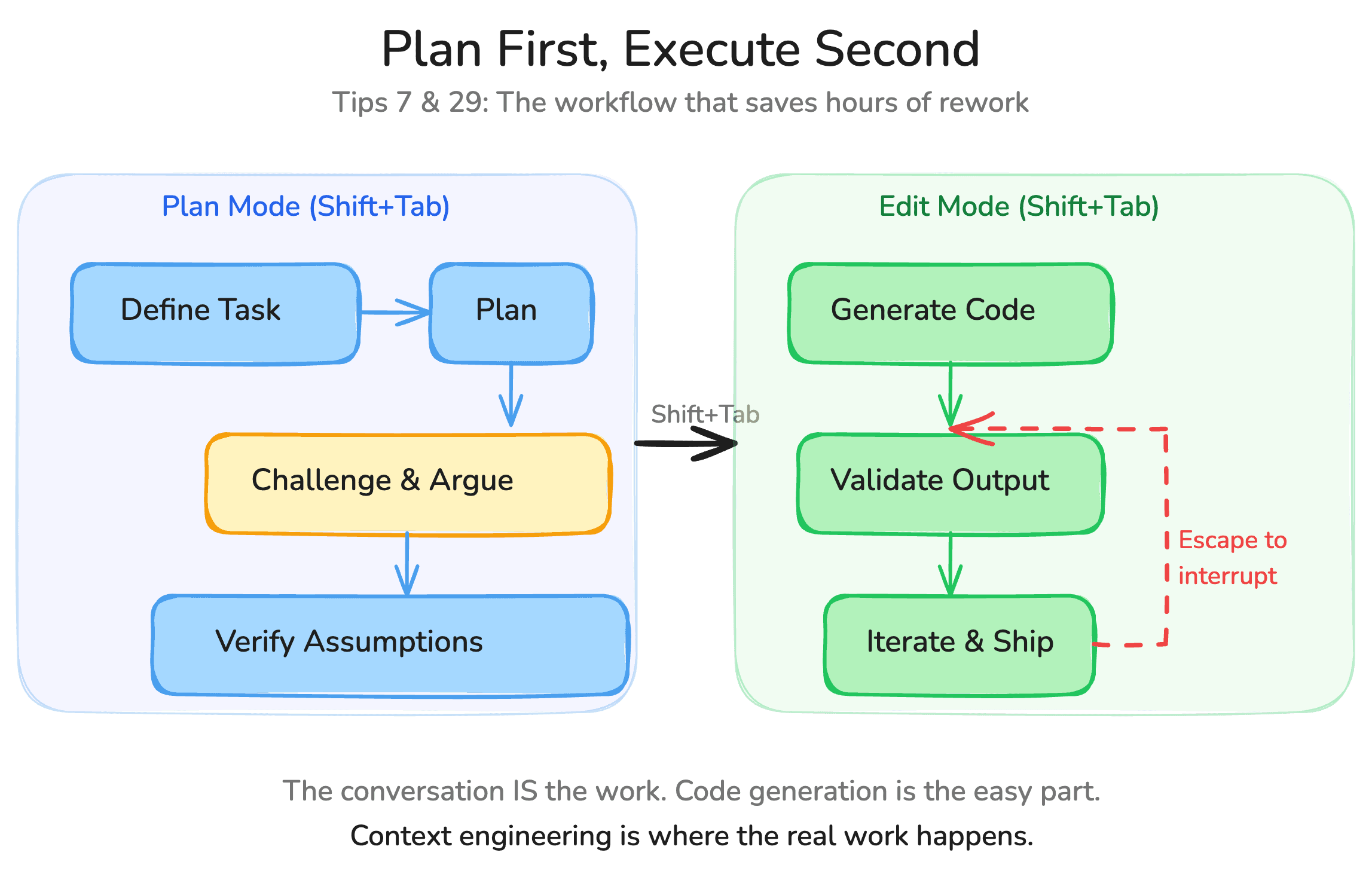
Tip 29: The workflow is plan, then execute. Never the reverse. I spend a disproportionate amount of time in plan mode. I argue with Claude. I challenge its assumptions. I ask it to consider alternatives. I treat it like a senior engineer I am pair programming with, not a code generator I am feeding instructions to. Only when I am satisfied with the plan do I switch to edit mode. This feels slow. It is not. The plans that take twenty minutes to get right save hours of rework in execution.
Tip 30: Treat Claude Code like a pair programming partner, not a tool. Challenge it. Disagree with it. Ask it why it chose one approach over another. The first answer is rarely the best answer. The conversation is the work. Vibe coding is not about accepting whatever the AI produces. It is about directing it toward something genuinely good. The best sessions I have had with Claude Code are the ones where we genuinely disagree for a while before converging on something better than either of us would have built alone.
Tip 31: Fresh context beats bloated context, every time. When your context is packed with failed attempts ("try this, no try that, no go back to the first thing"), Claude loses track of what is good and what is not. It is like trying to navigate by a map that someone has scribbled corrections all over. Start clean. Build context deliberately. A focused five-message session with good context will outperform a fifty-message session with confused context.
Every time.
Tip 32: Persist your context between sessions. This is the "second brain" concept. When you finish a productive session, tell Claude to save a summary to your local project notes. When you start a new session tomorrow, tell Claude to load that context. You get fresh context that is also informed by yesterday's work. Lazy-load only what you need for the current task, not everything you have ever done. I am still refining this workflow, honestly. Some days it works beautifully. Other days I load too much and end up right back in bloated context territory. The balance is an art, not a science.
Tip 33: Manage your todos inside Claude Code. I keep all my project todos in my local Claude project directory. When I start a session, I tell Claude to load my todos. When I finish something, I tell it to update the list. Keeping everything inside the tool where the work happens, instead of switching to Asana or Jira or that third project management tool your team adopted and nobody actually uses, reduces friction dramatically.
Tip 34: Think creatively about validation loops. Beyond "build and run tests," there are dozens of validation strategies most people never consider. Have Claude add debug logs, run the app, control the emulator, and read the logs. Hook into Perfetto traces to find jank. Use Puppeteer to navigate your web app and verify UI state. Write integration tests that Claude can execute. The more creative your validation loop, the better your output. This, not prompt engineering or model selection, is the real differentiator between people who get mediocre results from AI coding and people who get great results.
Tip 35: If you can afford Opus, use Opus. The quality difference matters for anything beyond boilerplate. And because I am running multiple instances anyway (as we will cover in the advanced section), the slower speed is irrelevant. I give one instance a task, move to the next, give that one a task, and cycle back. I am never waiting. The cost is higher, yes. But here is some quick math: Opus runs me roughly $150-200 per month in heavy usage. A single day of my billable time is worth more than that. If Opus saves me even one day per month, and it saves me far more than one day, the ROI is absurd.
Tip 36: Watch for assumption keywords and interrupt early. When you see Claude say "I'm not really sure" or "I'll assume" or you notice it going down the wrong path in its thinking, interrupt immediately. Do not let it build on a bad foundation. Hit Escape, course-correct, and restart the generation. The phrase "I assume" should trigger the same reflex as a smoke detector going off. Something might be fine. But you should probably check.
Power User Features (Tips 37-44)
Tip 37: Skills are just saved workflows. Do a workflow manually once (fetch Hacker News for iOS articles, summarize, save to notes) and then tell Claude "save what we just did as a skill called fetch-hackernews." Behind the scenes, Claude creates an MD file with the system prompt for that workflow. Next time, you just say /fetch-hackernews and it replays the entire thing. Skills and slash commands are now interchangeable since Anthropic recently merged the two concepts. It took me an embarrassingly long time to start building skills, and now I cannot imagine working without them.
Tip 38: Never manually create skills, MCPs, or configurations. Ask Claude to do it. "Install this MCP for me." "Create a skill from what we just did." "Add a pre-commit hook that runs the linter." This is a fundamental mindset shift: you are no longer manually maintaining your work environment. You are telling your AI partner to maintain it for you. The first few times it feels strange, like asking someone else to organize your desk. Then it feels like freedom.
Tip 39: MCPs are powerful but dangerous for your context. Every MCP call dumps output into your context window. I have seen MCP-heavy sessions burn through tokens at 10x the normal rate, and I am not exaggerating because I measured it. Install only what the current project requires. Disable MCPs you are not actively using. Check /context regularly to see which MCPs are consuming the most. The best Claude Code setup is one with the minimum number of MCPs needed, and nothing more. Treat them like spices in cooking. A little enhances the dish. Too much ruins it.
Tip 40: Sub-agents are for atomic, parallel, isolated tasks. Need to audit your codebase architecture while you work on a feature in the main session? Spawn a sub-agent. Need to run a long investigation that does not need your active attention? Sub-agent. The key property is that the work is self-contained. It does not need the full context of your main session to produce useful results. If you want to go deeper, our guide on building custom agents covers how to define specialized sub-agents with their own tools, models, and personalities.
Tip 41: Do not spread context across sub-agents. This is a mistake I see constantly, and one I made myself for weeks before I understood why my results were mediocre. People create a "testing agent," a "code review agent," a "documentation agent," and then wonder why the results feel thin. When a sub-agent finishes, only its output comes back to the main session. Not the reasoning. Not the context it built along the way. If a task needs deep context about the code being written (testing, validation, review), keep it in the main session. Bring the work to the context. Do not spread the context across agents.
Tip 42: --dangerously-skip-permissions is YOLO mode. The name is accurate. Use it when you trust the environment: local development on a throwaway branch, sandboxed containers, testing environments. Never use it on anything you cannot reflash. I once let Claude Code loose on a Linux machine with skip permissions and had to reflash the entire OS afterward. The machine is fine now. My confidence took longer to recover.
Tip 43: Use /permissions to set safety boundaries. Even when running with elevated permissions, you can define boundaries. Block destructive mutations like rm -rf, database drops, anything that touches production data. Think of it as a guardrail for the guardrail you just removed. Because sometimes the bravest thing you can do is admit you need a safety net. (Especially at 2 AM. Nothing good happens to production databases at 2 AM.)
Tip 44: Hooks are pre/post automation triggers. Post-tool hooks can auto-run linting after every file edit. Pre-tool hooks can block dangerous operations before they execute. Just ask Claude to set them up: "Add a post-tool hook that runs ESLint after any file write." Do not manually edit hook configurations. Let Claude manage Claude's own infrastructure. For detailed recipes covering pre-commit checks, auto-formatting, and notification hooks, see the Claude Code hooks complete cookbook.
Advanced Workflows (Tips 45-50)
Tip 45: Run multiple Claude Code instances in parallel. This is the real game-changer, the thing that fundamentally transformed how I work and made me reconsider what a single developer can accomplish in a day.
I run three to five Claude Code instances simultaneously in iTerm, each on a different task. One is planning a new feature. One is executing on a feature I already planned. One is investigating a bug. I cycle between them with keyboard shortcuts (Command+Left/Right bracket in iTerm), giving each one instructions and moving on while it works.
It feels like playing Starcraft: managing multiple fronts, allocating attention where it is needed most, keeping everything moving forward at once. And it is why I dropped VS Code and Cursor entirely in favor of terminal-only development. The overhead of a full IDE does not make sense when the AI is generating the code and you are orchestrating the process. You do not need syntax highlighting when your job is strategy.
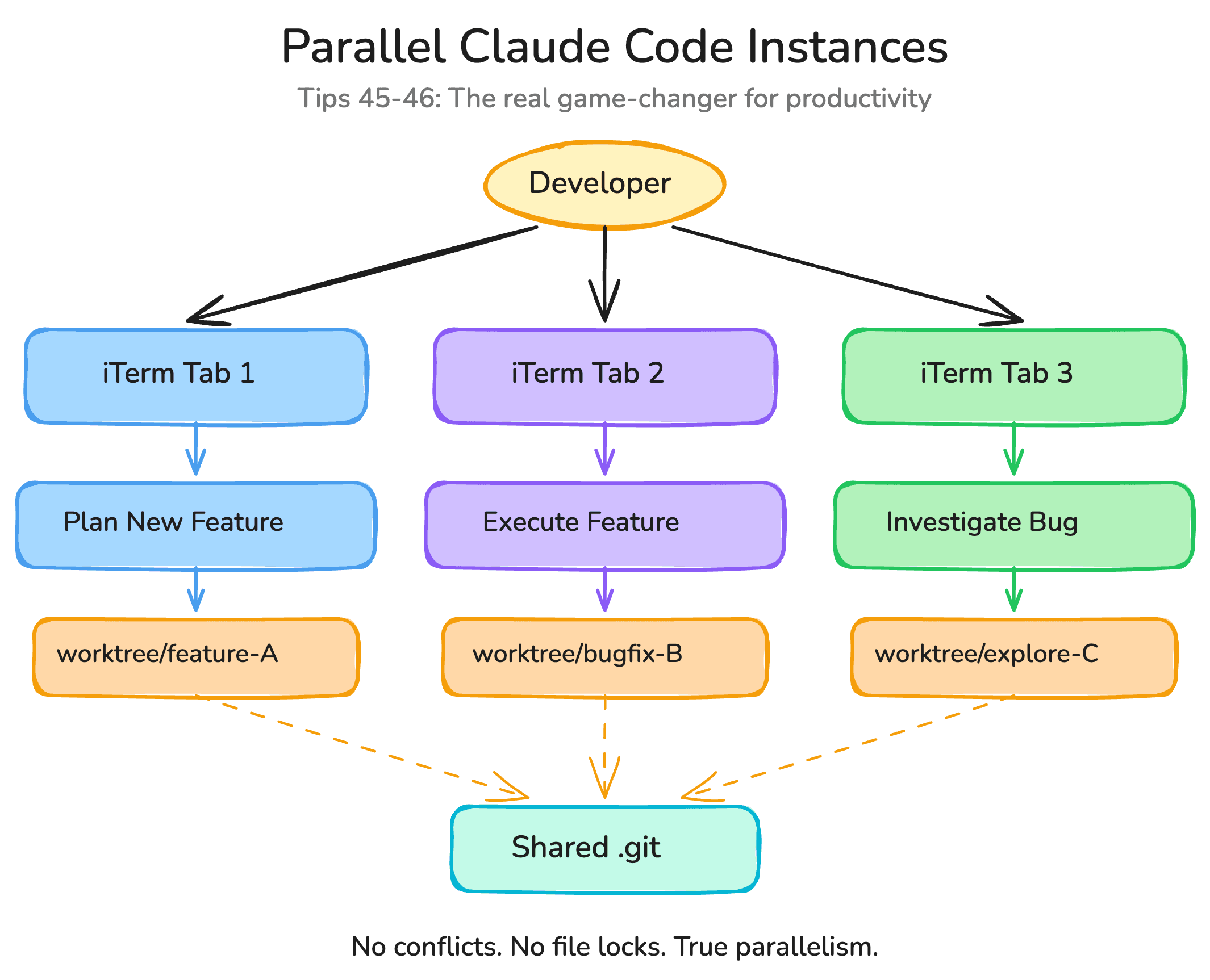
Tip 46: Git worktrees unlock true parallel code execution. The bottleneck with multiple instances is that they all want to edit the same files. Git worktrees solve this by creating multiple working copies of your repo, each on a different branch, sharing the same .git directory. One instance works on feature-A in one worktree. Another works on feature-B in a separate worktree. No conflicts, no file locks, true parallelism. Setting this up takes five minutes. The productivity gain is permanent. We wrote a full walkthrough on parallel agents with git worktrees if you want the step-by-step setup.
Tip 47: /chrome turns Claude into a browser automation agent. This is composable with everything else. You can create a skill that opens Chrome, navigates to a URL, fills out a form, takes a screenshot, and brings the data back to your session. I use it when I need to scrape data from a site without an API, or when I need Claude to visually verify that a UI change looks correct in a real browser. It is the closest thing to giving your AI partner eyes.
Tip 48: Enable notifications for completed tasks. When you are juggling multiple instances, you need to know when one finishes. Tell Claude to add a notification sound on completion. I experimented with text-to-speech summaries for a while, where Claude would read aloud a summary of what it did when it finished. That was too much. A simple chime is perfect. Hear the chime, switch to that tab, review the output, give the next instruction. It turns into a rhythm, a kind of industrial music for knowledge workers.
Tip 49: Explore the plugin ecosystem. A plugin is just a composition of the primitives we have covered (skills, MCPs, hooks, sub-agents, bash scripts) packaged together and shared. The community is building plugins for everything from database migrations to design system enforcement. Before building something from scratch, check if someone has already packaged it. And if you build something useful, share it back. The ecosystem is young. The people who contribute now are shaping what this tooling becomes for everyone.
Tip 50: Context is king. If you remember nothing else from this post, remember this. The quality of Claude Code's output is a direct function of the quality of the context you give it. Fresh beats stale. Condensed beats bloated. Relevant beats comprehensive. Every tool in Claude Code (/clear, /compact, /context, sub-agents, the CLAUDE.md hierarchy, the second brain workflow) exists to help you manage context. Master context engineering and you master vibe coding itself.
The meta-lesson
Six months of daily use has taught me something I did not expect: the people who get the most out of Claude Code are not the ones who know every feature. They are not the best prompters, either. They are the ones who understand one thing deeply. Your job is no longer to write code. Your job is to build the right context, verify the output, and iterate.
Strategy, taste, and judgment. Those are the skills that matter now. The keystrokes became a commodity. The thinking never will.
I am still learning this. I still catch myself micromanaging code generation when I should be stepping back and thinking about architecture. I still occasionally let a bloated session run too long because I am too deep in the flow to stop and start fresh. I still get it wrong. But I get it wrong less often than I did six months ago, and that trend line is what matters.
Go build something. And if these tips helped, or if you have tips we missed, come find us. We also published a 2026 update to these tips covering everything new since this post first went live. That is what vibecoding.ae is for. The conversation is always open, and the best insights come from the people doing the work.